


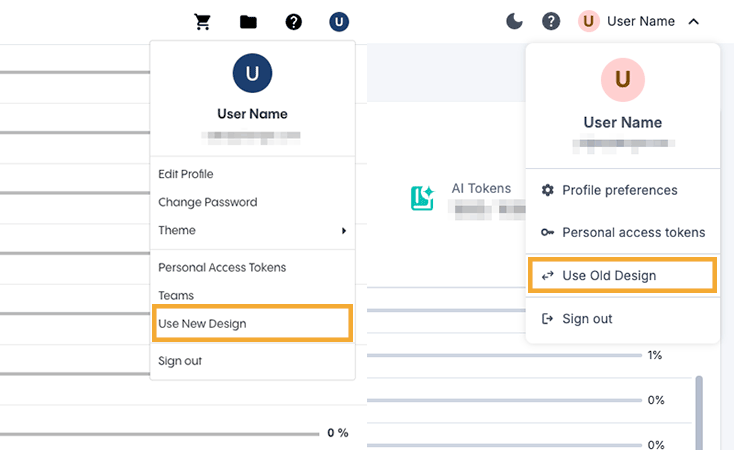
⭐ The dashboard received a complete redesign. The new interface provides a cleaner, more intuitive design that aligns with other GlobalLink products for a more consistent experience across the platforms. The new UI improves navigation and reorganizes content to make it easier to find the tools and information you need.
Users will still see the old interface when they log in, but they can easily switch back and forth between the old and new interface by clicking their Avatar > Use Old Design or Avatar > Use New Design, at the top-right corner of the dashboard.
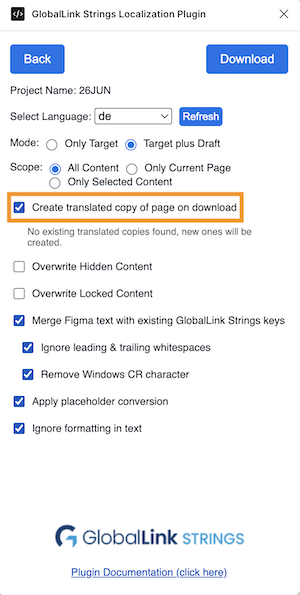
⭐ We've added a new "Create translated copy of page on download" option to the plugin's Download settings. When enabled, the plugin automatically creates a translated copy of a specific page or all pages in a Figma file as part of the download via the plugin.
⭐ We've replaced the Inspect & Edit Keys section of the plugin with the new Link Text to Keys feature. It allows users to easily link text elements in their Figma designs with existing keys in their GL Strings project.
The plugin will automatically suggest Figma text element <> GL Strings key matches based on the key naming pattern configured under the Plugin Settings. All previous functionality is still supported under the new Link Text to Keys section. Users can still find which key in GL Strings is linked to a specific text element in Figma and update as needed.
This update is aimed at teams that localize app content during the design stage. Text in Figma and text pulled from app string files in GL Strings often differ - sometimes slightly, sometimes substantially. Until now, that text had to be manually aligned before Figma and app content could be linked via the plugin. Not anymore!
⭐ We now support Figma Buzz, the new Figma tool for creating on-brand marketing assets. The Figma Buzz plugin offers the same features as the classic GL Strings plugin for Figma Design and can be accessed in Figma Buzz like any other plugin.
⚙️ We've added a new "Merge Duplicates" option in the Translation Orders plugin feature. When enabled, all duplicate text will be merged into one single key in GlobalLink Strings. If disabled, duplicate texts will be uploaded as separate keys. With this new setting, users can define if duplicate text should share the same translation or have different translations based on context.
⚙️ Going forward, when a user applies any of our existing AI features to translate, rephrase or shorten a translated value, GL Strings will automatically apply any existing glossary terms first. This ensures that glossary terms take precedence over any preconfigured AI context.
⚙️ It's now possible to export screenshots as a PDF and exclude keys from the exported file. We've added a new "Exclude Strings" option in the Export settings, allowing users to choose whether to include or exclude the keys associated with each screenshot.
Learn about our latest features and improvements
Read the Full Article
Learn about our latest features and improvements
Read the Full Article